Label Maker Machine with Tape, P21
Label Maker Machine with Tape, P21
Couldn't load pickup availability
- 2026 New Version: Compared with traditional label makers, Nelko P21 label maker has half the weight and size, making it smaller, smarter, and ultra-portable. The wireless Bluetooth label maker can slip into your pocket, allowing you to print anytime, anywhere. For great printing results, we recommend using our NELKO thermal label paper. Important Note for iOS Users: Please make sure you have updated your Nelko P21 app to the latest version (V4.8.0) for a great experience
- High-quality Printing: The P21 label maker features BPA-Free Direct Thermal Technology. Equipped with high-speed chips and 203 DPI, the P21 label maker delivers high-definition printing without ink or toner. The label maker comes with a long-lasting built-in rechargeable battery for extended use. This label maker prints in monochrome (black text only), and you can create color labels by using color pattern label tapes. Note: Charging adapter not included
- Easy to Use: NELKO label printer connects with iOS & Android phones via Bluetooth. Step 1: Download "Nelko" app from Google Play or App Store. Step 2: Install paper roll. Step 3: Connect P21 via Bluetooth in the APP. Step 4: Choose a quick template and print. It is not compatible with Google phones running Android 14. This label maker's APP includes 3600+ icons, 700+ borders, 5500+ materials, 750+ templates, 29 languages. Note: This label maker doesn't work with computers
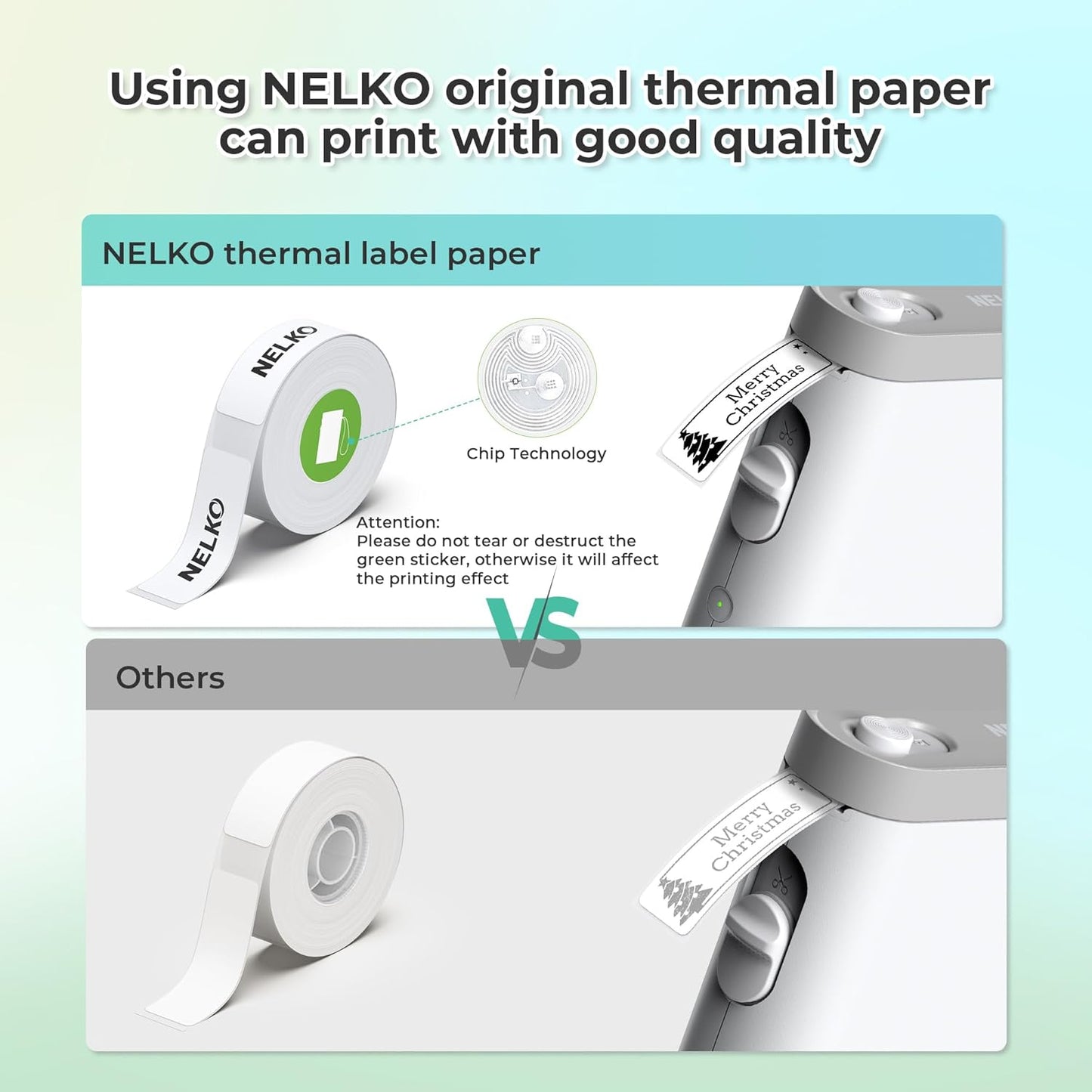
- Multiple Creative Functions&Templates: This app for the label maker provides various features and templates, making it easy to create various designed label stickers in the App with text, QR code, barcode, materials, images, time and borders, etc. The length of labels is fixed, including 14×40mm, 14×50mm, 14×75mm, and more. Please do not tear or damage the green sticker on the back of the label strip, otherwise it will affect the printing effect. (Note: Continuous label tapes are not supported.)
- Design Your Own Labels: This label maker machine with tape is widely used at home, in the office, and at school. At home, it helps organize clothes, food storage, cosmetics, and mailings. In the office, it is ideal for notebook tags, price tags, reminder labels, and other office supplies. At school, it supports teachers and students with name tags, item identification, and classroom organization. You can also use it to create unique Christmas surprises
Product description
Nelko P21 Label Maker for Valentine Christmas Thanksgiving Surprises
P21 label maker
Merchant VideoP21 label makers label maker label maker machine
Merchant Video2026 New Version NELKO P21 Mini Portable Bluetooth Label Makers
Warm Tips:
1. Download the App "Nelko" from the Apple Store/Google Play, and meets with applicable data compliance laws.
2. Connect the Bluetooth via the "Nelko" App, not on the phone system.
3. Before printing, please select the appropriate size for the printing paper on the "Nelko" App.
-
How to connect Bluetooth?
1. Connecting to Bluetooth through the "Nelko" APP.
2. Download the App "Nelko" from the Apple Store/Google Play.
3. Turn on Bluetooth on your phone, long press to turn on the P21 labelmaker machine, and open the "Nelko" app to link to Bluetooth.
-
What system does this label machine support?
This mini portable Bluetooth printer supports iOS and Android mobile systems. IOS phones require IOS 13 or above to be used.
-
Why is the printing unclear?
Please use genuine label paper, otherwise it may result in poor printing quality or mismatches.
Note: Please do not tear the green sticker from the original label paper.
And the size of the label tape can be 12x40mm, 14x40mm, 15x40mm or 14X75mm.
-
How to use the label makers best sellers with tape correctly?
1. Long press the power on button, indicator light will display green.
2. Successfully connected to Bluetooth, indicator light displayed in blue.
3. Press the button twice to adjust the paper position.
4. Press the button once to print the test page.
-
Why can I search for P21 label maker but not connect to Bluetooth?
1. Press the power button to start the label maker.
2. Open the paper bin cover of the label maker.
3. Press the power button 3 times in a row.
4. After about 2s, the label maker beeps 4 times, "Didi Didi", which means the reset is successful.
Work with NELKO P21 Labal Maker Machine
| Customer Reviews | 4.7 out of 5 stars 5,602 | 4.7 out of 5 stars 152 | 4.4 out of 5 stars 422 | 4.6 out of 5 stars 55 | 4.8 out of 5 stars 1,442 | 4.7 out of 5 stars 961 | 4.7 out of 5 stars 128 |
| Price | $7.99$7.99 | $17.99$17.99 | $69.99$69.99 | $28.99$28.99 | $12.99$12.99 | $14.99$14.99 | $15.99$15.99 |
| Pack | 180 Labels | 1 | 3 | 3 | 1 | 540 Labels | 540 Labels |
| Color | White | Christmas | White | Black | Blcak | Yellow/Pink/Blue | Transparent |
| Size | 14mm x 40mm | 14mm x 40mm | 4.2x1.69x5.4 inch | 14mm x 40mm | 6.5 x 2.5 x 4.5 inches | 14mm x 40mm | 14mm x 40mm |
| Compatible Printer | NELKO P21 Label Maker | NELKO P21 Label Maker | Work with PP01 Photo Paper | NELKO P21 Label Maker | NELKO P21 Label Maker | NELKO P21 Label Maker | NELKO P21 Label Maker |
| Advantage | Clear Printing, Widely Usage | Clear Printing, Widely Usage | Clear Printing, Widely Usage | Clear Printing, Widely Usage | Powerful Compatibility | Clear Printing, Widely Usage | Clear Printing, Widely Usage |
| High Quality | ✓ | ✓ | ✓ | ✓ | ✓ | ✓ | ✓ |
Share