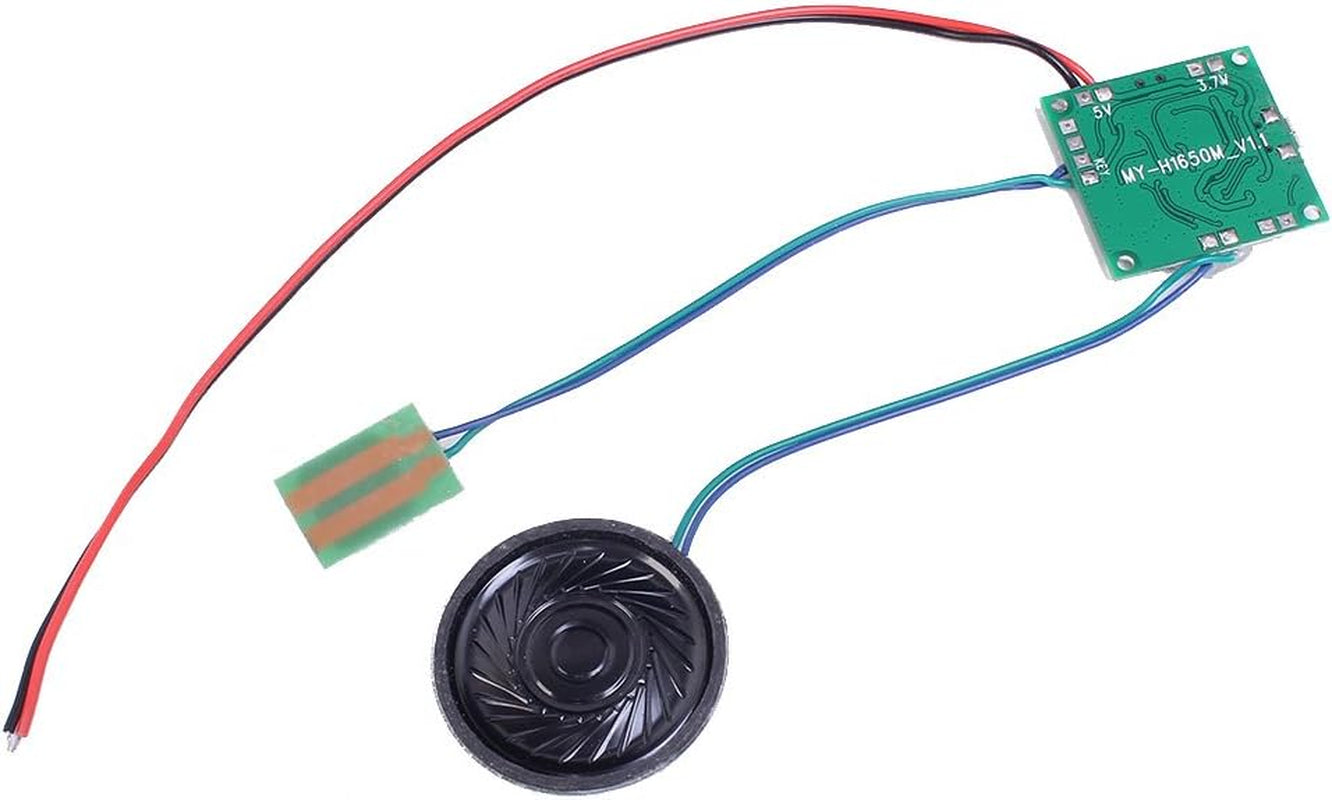
Recordable Sound Module, Button Control
Recordable Sound Module, Button Control
Couldn't load pickup availability
- 【CREATIVE PRESENT】Sound Module is ideal to make a DIY music box, surprise as a birthday present,musical greeting cards, photo frames, album, present box and the other creative presents for Mother's Day, Father's Day and Valentine’s Day,perfect for memorabilia.【Please note: Be sure to download the user manual from Product guides and documents】
- 【8M MEMORY】When connected to a computer via a micro USB data cable, Sound Module is recognized as a USB drive, just like an MP3 player. With 8MB of internal storage, you can add any MP3 audio files to it.
- 【PUSH BUTTON CONTROL】Installed in your project/present, simply press the button to play the music you input once, and Sound Module will automatically stop when the song is over.
- 【PROGRAMMABLE SOUND MODULE】The programmable sound module provides more possibilities to develop a module that fits your own project perfectly. Different trigger modes (button/TTL) can be selected by connecting different solder pads.
- 【VOLUME CONTROL】The volume is adjustable, and the power supply voltage is 4.5-5V. We recommend using a 3.7V lithium battery (battery not included) with an output power of 0.5-1W. Please connect to a computer with USB 2.0 port (black or white port), otherwise, the module will not be recognized. Connect the red and black wires to the battery to play music
Product description
Troubleshooting:
If the computer does not recognize the module:
1.Please use USB data wire but not use USB power wire.
2.Support windows only.
If it can't play music:
1.Format the module first and then insert the music file.
2.Micro USB is used to update the voice file and cannot provide the power needed for playback. So it can not play music if just connect USB.
3.Please remove USB before play music.
ICSTATION
- ICStation has 9 years experience on electronic industry products
- Looking forward to your inquiry and hope to built long term cooperation relationship with you!
Icstation Music Player Sound Module with Speaker 8M
Button Control for DIY Musical Christmas Gift
It is ideal to make a DIY music box, musical greeting cards, memorabilia, photo frames, album, gift box and the other creative gifts. Install it in your project/gift, and then push the button. Your music which you put in it will be played once and automatically stop when the song finishes.
It has 8M memory with programmable design, just use your smart phone USB cable can update the music.
- Power Supply Voltage:4.5-5V or 3.7V lithium battery
- RAM:8M
- Output:0.5-1W
- Control mode:button / TTL
- Board Size:30*30mm Speaker Size:D36mm
Button Trigger
Press the button, and you will hear the music. Press the button during playback, then it will stop playing immediately.
The 0.5W speaker is loud and has good sound.
The sound level was good enough for a music box. Volume is adjustable using a small potentiometer on the circuit board.
- "Simple, yet aesthetically pleasing to the ears, this thing puts out a good amount of sound."——Aaron
- "This kit is super easy to use, and it only took me 10 minutes to set up and use. Anyone can do this small project! Its just that easy! "——Andrey
8M Memory
It is recognized by computer as a USB drive, just like a MP3 player, and you're free to add any MP3/WAV audio file to the internal storage as long as it doesn't go over the 8MB limit.
Please note that a micro USB DATA Cable needs to be used to interface with this sound module. A micro USB charging cable is insufficient and will not work.
- "This thing works great so far, and the USB interface made uploading a file stupid easy. "——Get'cha Pew On
Perfect for memorabilia
Recordable music sound module, specially designed for DIY musical greeting cards, memorabilia, photo frames, gift boxes and the other creative gifts.
- "WORKS PERFECT! I got this to add music to an art piece I made, a layered paper cut project in s shadow box frame. "——A. Alloy-McFarlin
- "Used this to build a custom Volvo door chime relay. Worked great and it "takes my breath away." ——Josh
Control mode
In the table,‘0' means having 3.3K resistor; '1' means without 3.3K resistor.
You can see that there are 3 resistors on the board, so the default mode is 000 (It will play the music once you press the button. If you press the button again during playing, it will stop immediately)
You can change to other mode by removing the resistor on the board. For example, if you want to set 001 (Under this mode, you need to hold down the button to play the music. It will stop once you release the button.), you need to remove the third resistor that marked C on the board. To remove the resistor, you need a soldering iron to melt the solder and take the resistor away. It is a little difficult if you are not good at soldering so we recommend you to use 000 default mode.
Power-ON-Play mode
It will enter Power-ON-Play mode if short circuit between two pads of button. That is to say, it will play voice immediately when power on.
Instructions
- Connect 4.5V~5V non-rechargeable battery power;
- Press the button, and you will hear a test music which is a Chinese song. Press the button during playback, then it will stop playing immediately.
- Connect the module to computer by USB cable; SUPPORT WINDOWS ONLY
- It is recognized by computer as a USB drive, just like a MP3 player, and you're free to add any MP3/WAV audio file to the internal storage as long as it doesn't go over the 8MB limit;
- Do not forget to delete the default audio file;
- Repeat Step 2 to see if the module work well. Adjust the volume to a suitable degree.
- PLEASE NOTE: The USB cable is used to update music, not to play. When playing music, you need to connect the battery with the red and black wires.
--------------------------------------------------------------------Frequently Asked Question--------------------------------------------------------------------------------
Q: Why the product came with NO INSTRUCTIONS?
A: We provide PDF instruction on this page. Please download it at: [Product information] →[Technical Specification] →User Manual [pdf ]
Q: Can I power the board with a USB battery stick? I used a power stick as power supply, the file will not play.
A: The micro-USB connector is on the circuit board for adding or removing sound files. The micro-USB connector is not for powering the device. Please wire a 3.7V Lithium Ion battery to the red/black wires. The red wire is positive and the black is negative.
Q: Why my Windows computer can't recognize the module?
A: Please note that a micro USB DATA Cable needs to be used to interface with this sound module. A micro USB charging cable is insufficient and will not work.
Q: I want to confirm that I can replace the speaker with a 1/8" audio jack and plug into a power speaker?
A: I am not sure if that it's feasible because the module and the audio jack output different audio signal. It may not work after transforming the audio signal, but you can have a try.
Q: Can I connect to a self-powered speaker?
A: Yes. But it should be 8ohm 0.5W speaker.
Q: I was able to put an mp3 file on it by using a microusb cable, but every attempt I've done feed the device with power hasn't produced any song.
A: The working voltage of the sound module is 4.5-5V. We recommend to use 3.7V lithium battery. I can see on the photo you sent me that you use a 9V battery, which is nearly 2 times of the acceptable voltage. It is very likely that the module has been burned out. Please try with a 3.7 lithium battery.
PS:
We are a growing company and appreciate every purchase. We strive hard to achieve happy customers. If you have any question with the product, please let us know. Thank you!
Share